

Before you start
You only need three things:
- A free Google account
- A computer for setup (phone or tablet works afterwards)
- A recent statement for each debt: balance, interest rate and minimum payment
Throughout this guide, light cells are the ones you type in. Everything else is calculated automatically and protected so nothing breaks.
Tour of the tabs
Planly Debt Melt has 1 tabs. Here's what each one does and what (if anything) you fill in.
Debt Calculator
Your whole snowball plan: an overview with your debt-free date, a card for each debt, your debt list and a month-by-month payoff schedule.
You fill: Currency, start date, monthly extra payment and your debts.
Make your copy
Your template lives in your own Google Drive, so the first step is making your personal copy.
- Open the PDF from your Etsy purchase (Etsy → You → Purchases and reviews → Download files).
- Click the “Make my copy” button. If you're asked, sign in to your Google account.
- Google shows a “Copy document” screen. Click the blue “Make a copy” button.
- Your copy opens. Rename it if you like (click the title in the top-left), e.g. “Debt-Free Plan”.
Tip: Bookmark your copy, or star it in Google Drive, so it's one click away.
Set your currency and start date
Two quick settings at the top left of the DEBT SNOWBALL CALCULATOR tell the plan where to begin.
- Next to CURRENCY, type your currency symbol ($, €, £…).
- Under START DATE, type the Year your plan starts.
- Choose the Month from the dropdown (the month your balances are from).
Tip: Light-colored cells are where you type. Everything else is calculated for you and protected, so nothing breaks by accident.
List your debts
Scroll down to the debt list. You can enter up to 15 debts: credit cards, car loans, student loans, personal loans and more.
- Sort your debts from the smallest balance to the largest before you start typing.
- In the first row, enter the DEBT NAME, INITIAL BALANCE, INTEREST RATE (the yearly rate on your statement) and MIN. PAYMENT for your smallest debt.
- Add the rest in order, one row each, ending with your largest balance.
- Check the TOTAL row: it adds up your balances, minimum payments and interest owed.
- INTEREST OWED and MONTHS LEFT fill in for each debt automatically.
Heads up: The calculator pays debts off in the order you list them. Your extra payment goes to the first row, then rolls down. For a true snowball, list your smallest balance first.
Add your extra payment and read the overview
The Overview shows what your plan costs and when you'll be debt-free.
- In the Overview, enter your Monthly extra payment, anything you can add on top of your minimums, even a small amount.
- Min payment and Total monthly payment show what you'll pay each month in total.
- Current Balance shows what you still owe, and Total interest owed shows the interest over the life of your plan.
- Below the settings, INITIAL BALANCE, MONTHLY PAYMENT and DEBT PAID OFF ON sum up your plan.
- Scroll right across the Overview to see a card for each debt with its own Debt Free Date, Initial balance, Min. Payment, Interest rate and Interest owed.
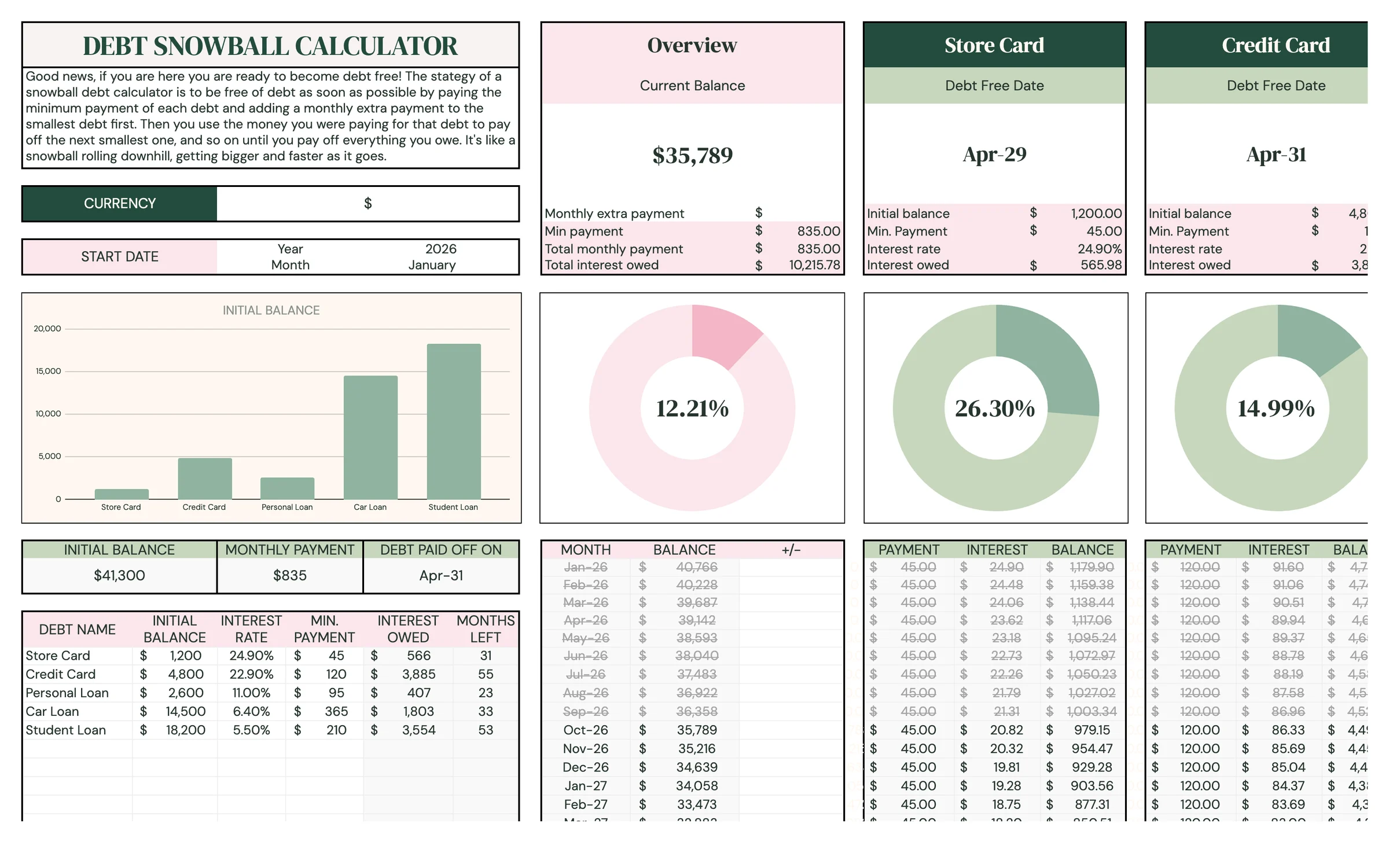
Tip: Try changing the Monthly extra payment and watch DEBT PAID OFF ON and Total interest owed move. It's a great way to find an amount that's worth it.
Follow the month-by-month schedule
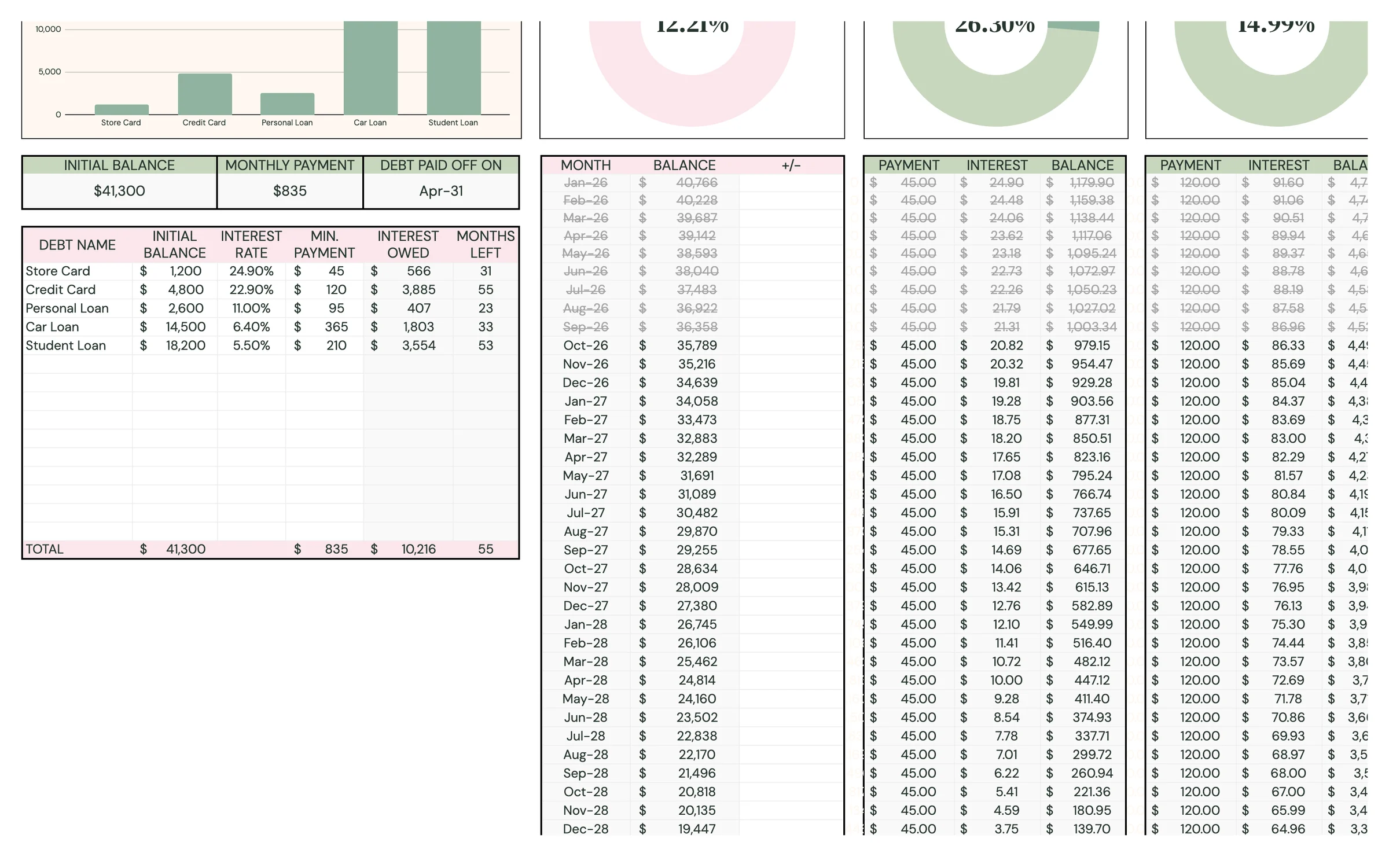
To the right of your debt list, the schedule shows exactly what to pay each month until every debt is gone.
- Each row is one MONTH, with your total remaining BALANCE.
- For each debt, the schedule shows the PAYMENT to make, the INTEREST charged and the BALANCE left.
- When one debt reaches zero, watch its payment roll into the next debt. That's the snowball.
- Got a bonus or tax refund? Enter it in the +/- column for that month and the plan recalculates from there.
Check in every month
A quick monthly check-in keeps you motivated and your plan accurate.
- Make the payments shown in the schedule for the current month.
- Add any extra one-off payment in the +/- column for that month.
- If you take on a new debt or a rate changes, update your debt list.
- Watch Current Balance shrink and celebrate each Debt Free Date you reach.
Tip: Once a debt is paid off, leave it in the list. The schedule needs it to roll its payment into the next debt.
Your routine
A few minutes a week keeps everything accurate.
- Make the payments from the schedule
- Log any extra payment in the +/- column
- Check Current Balance and your debt-free date
- Compare balances with your statements
- Update interest rates or minimums that have changed
- See if you can raise your Monthly extra payment
Tips & tricks
Snowball the easy wins
Paying off the smallest balance first gives you a quick win and frees up its payment for the next debt. That momentum is what makes the snowball work.
Prefer the least interest?
List your debts from highest interest rate to lowest instead. The calculator follows your order, so the extra goes to the most expensive debt first (the avalanche method).
Use it on your phone
Install the free Google Sheets app and open your copy to check your schedule anywhere.
Share with a partner
Click Share in the top-right and add your partner's email, so you can work toward debt-free together.
Save a snapshot
File → Make a copy before big changes, so you can compare plans side by side.
Prefer dark mode?
Your order includes a Dark Mode edition with the same tabs and formulas. Open the link in your PDF and tap “Make my dark copy”. You can keep both and use whichever you like.
Troubleshooting
I don't see “Make a copy”.
Make sure you're signed in to a Google account. On a phone, open the link in your browser (not the Etsy app) or in the Google Sheets app.
A cell says it's protected when I type.
That cell holds a formula. Type only in the light input cells. That's what keeps everything calculating correctly.
I see a warning about the graphs and the start date.
The graphs only show data when the START DATE is before the current month. Set the Year and Month to last month, or the month your balances are from.
The extra payment is going to the wrong debt.
The extra always goes to the first debt in your list. Reorder your rows so the debt you want to tackle first is at the top.
My debt-free date looks too far away.
Check that each MIN. PAYMENT is more than the interest charged each month. Then try a larger Monthly extra payment and see how much closer the date gets.
Still stuck? Message us on Etsy or email help.planly@gmail.com and a real person will help.
Don't have Planly Debt Melt yet?
See your debt-free date, and move it closer.